
From Migration to Resilience: Mastering 7Rs and Day-2 Disaster Recovery on AWS

Moving enterprise workloads to the cloud is rarely a single event. It is a strategic continuum that begins with workload rationalization (the 7Rs), moves through zero-downtime data and server transition pipelines, and cements itself in Day-2 operational resilience, data protection, and business continuity. I learned this the hard way during a recent migration of a legacy system to AWS, hitting multiple brick walls along the way. This guide captures architecture patterns, service interactions, and field-tested strategies from actual migration and disaster recovery implementations.
The Cloud Journey Continuum: Beyond Just "Getting There"
When organizations plan cloud migrations, the spotlight almost always shines on the cutover weekend. That is the high-stress window where DNS TTLs expire, databases replicate the final delta, and traffic swings to the cloud.
However, treating migration as a one-and-done project is one of the most common anti-patterns in enterprise engineering. A successful migration is not defined by landing instances on EC2; it is defined by whether the migrated workloads are:
Resilient to infrastructure and regional failures.
Protected against corruption, ransomware, and human error.
Compliant with corporate retention policies and regulatory mandates.
Optimized for hybrid operational reality, where on-premises and cloud systems coexist for months or years.
To navigate this journey, we need a disciplined framework to categorize every workload, a dedicated set of migration engines to move servers, data, and databases without downtime, and a post-migration resilience architecture that ensures Day-2 stability.

| Phase | Strategic Focus | Primary AWS Enablers |
|---|---|---|
| 1. Assess & Plan | Portfolio discovery, dependency analysis, and 7Rs categorization | AWS Transform |
| 2. Migrate & Cut Over | Database CDC, bulk storage movement, and server lift-and-shift | AWS SCT, DMS, DataSync, MGN, Storage Gateway |
| 3. Operate & Protect (Day-2) | Immutable backups, continuous block-level DR, and regional routing controls | AWS Backup, DRS, Resilience Hub, ARC, Route 53 |
Workload Rationalization: The AWS 7Rs Framework in Practice
Every migration begins with portfolio discovery and workload rationalization. AWS identifies seven distinct migration strategies, collectively known as the 7Rs. Understanding the nuances of each strategy dictates the tooling and architecture required.
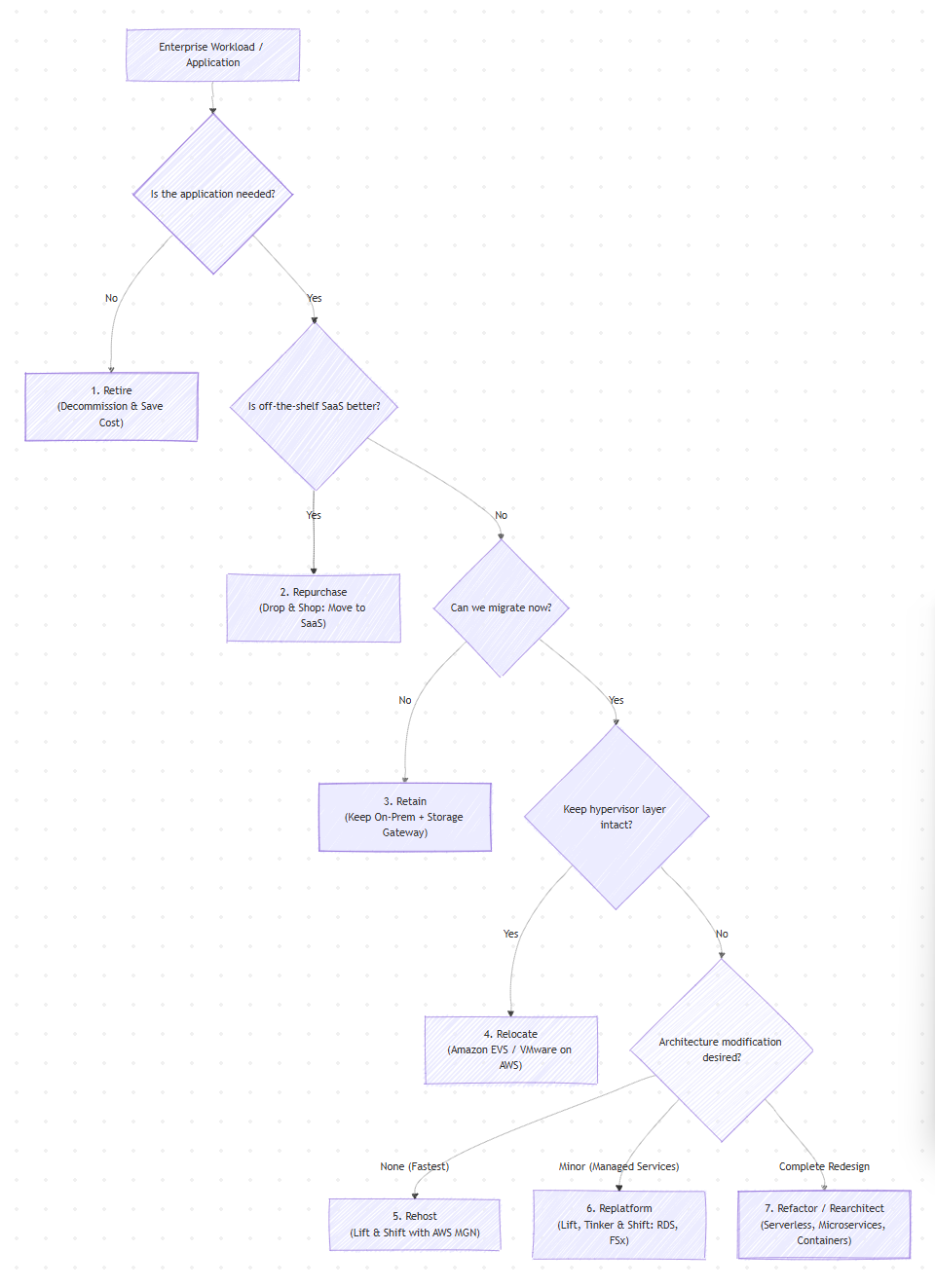
The 7 Strategies Breakdown:
| Strategy | Definition | Ideal Workloads | Primary AWS Enablers |
|---|---|---|---|
| 1. Rehost (Lift and Shift) | Moving applications directly to AWS without code or architectural changes. | Legacy enterprise applications, tight data center exit deadlines, COTS software. | AWS Transform MGN (Application Migration Service) |
| 2. Relocate (Hypervisor Shift) | Moving bare-metal or hypervisor-level workloads to cloud-hosted VMware/hypervisors without changing OS or config. | VMware clusters where keeping the existing vSphere management stack is mandatory. | Amazon EVS, VMware Cloud on AWS |
| 3. Replatform (Lift, Tinker & Shift) | Making targeted optimizations (e.g., swapping self-managed DBs for managed DBs) without changing core code. | Self-managed Oracle/MSSQL moving to Aurora/RDS or on-prem file servers moving to managed FSx. | AWS DMS, AWS SCT, AWS DataSync |
| 4. Refactor / Rearchitect | Redesigning the application from the ground up using cloud-native paradigms. | Monoliths transitioning to event-driven architectures, microservices, or serverless. | Amazon ECS/EKS, AWS Lambda, DynamoDB |
| 5. Repurchase (Drop and Shop) | Retiring custom/legacy systems in favor of purpose-built SaaS products. | Legacy on-prem HR, CRM, or ticketing systems moving to modern SaaS platforms. | AWS Marketplace |
| 6. Retain (Revisit Later) | Keeping workloads on-premises due to compliance, latency, or depreciation, while bridging with cloud storage. | Data that must remain within local jurisdiction or low-latency industrial floor machinery. | AWS Storage Gateway (File/Volume/Tape) |
| 7. Retire | Decommissioning legacy servers, environments, and data streams that no longer provide value. | Zombie VMs, redundant dev/test stacks, obsolete ETL pipelines. | AWS Transform (Portfolio Discovery & Assessment) |
The Migration Engine Room: Deep Dive into Core Services
When executing migrations across Rehost, Replatform, and Retain, four purpose-built services handle the heavy lifting: SCT, DMS, DataSync, and Storage Gateway, flanked by Transform MGN for whole-server block replication.
AWS Schema Conversion Tool (SCT) & Database Migration Service (DMS)
Database migrations fall into two categories: homogeneous (e.g., PostgreSQL on-prem to Amazon Aurora PostgreSQL) and heterogeneous (e.g., Oracle or Microsoft SQL Server to Amazon Aurora MySQL/PostgreSQL).
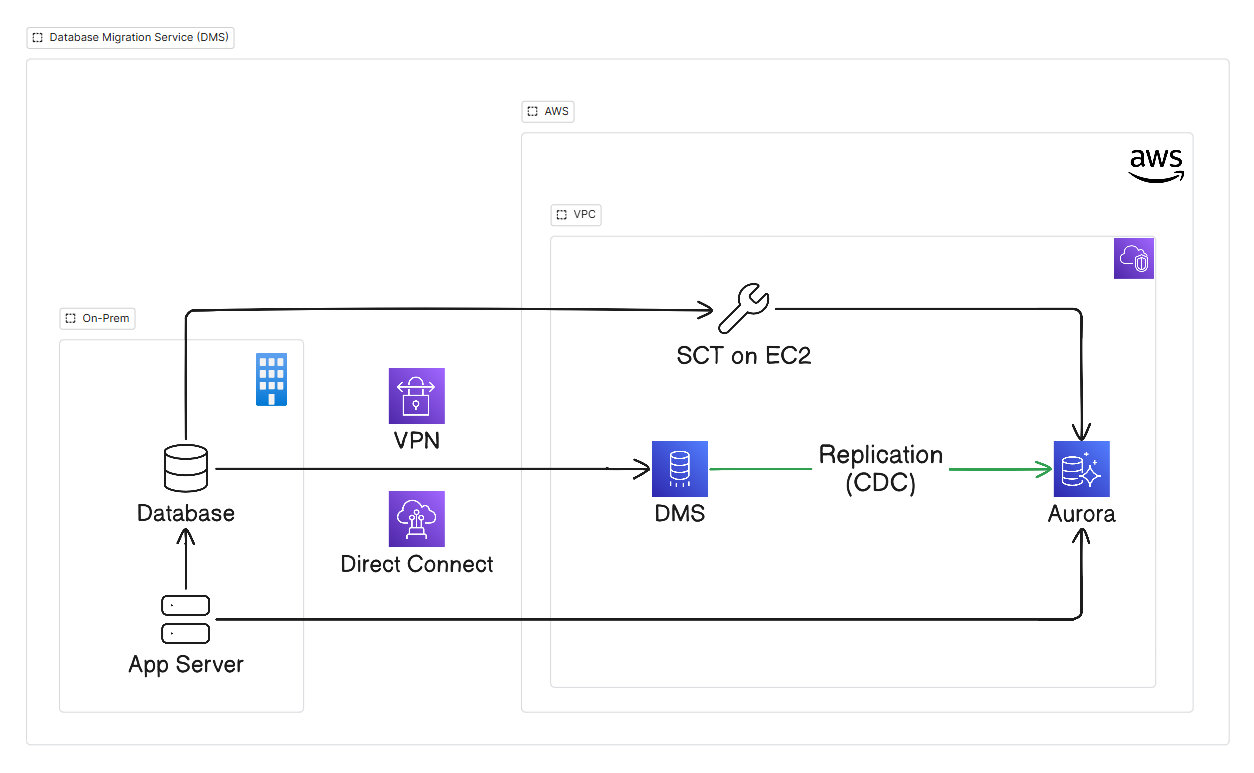
1. AWS Schema Conversion Tool (SCT)
Role: SCT evaluates existing proprietary database schemas (Oracle, Microsoft SQL Server, DB2, etc.) and converts schema objects such as tables, views, indexes, constraints, triggers, and PL/SQL/T-SQL code into targets like Amazon Aurora or Amazon RDS.
Assessment Report: Generates an exhaustive report showing what percentage of the schema can be converted automatically, and flags custom routines, complex cursor logic, or proprietary extensions that need manual rewriting.
Deployment: SCT can run locally on an administrative workstation or on an EC2 instance within the target VPC connected via VPN or Direct Connect.
2. AWS Database Migration Service (DMS)
Role: Moves live database data from the source to the target with minimal downtime.
Phase 1: Full Load: DMS reads the source tables and populates the target database schema created by SCT.
Phase 2: Change Data Capture (CDC): While the full load is progressing and applications are actively writing to the source database, DMS captures database transaction logs (e.g., Oracle Redo Logs, SQL Server Transaction Logs, MySQL Binlogs) and replays changes onto the target database.
Cutover: When the replication latency drops to near-zero seconds, application traffic is temporarily stopped on-prem, the final delta applies, connection strings are updated to point to the Aurora cluster endpoint, and application servers are spun up in AWS.
AWS DataSync vs. AWS Storage Gateway
Unstructured file data, NFS/SMB shares, and object datasets require a different strategy than structured databases. One of the most critical architectural decisions is choosing between AWS DataSync and AWS Storage Gateway.
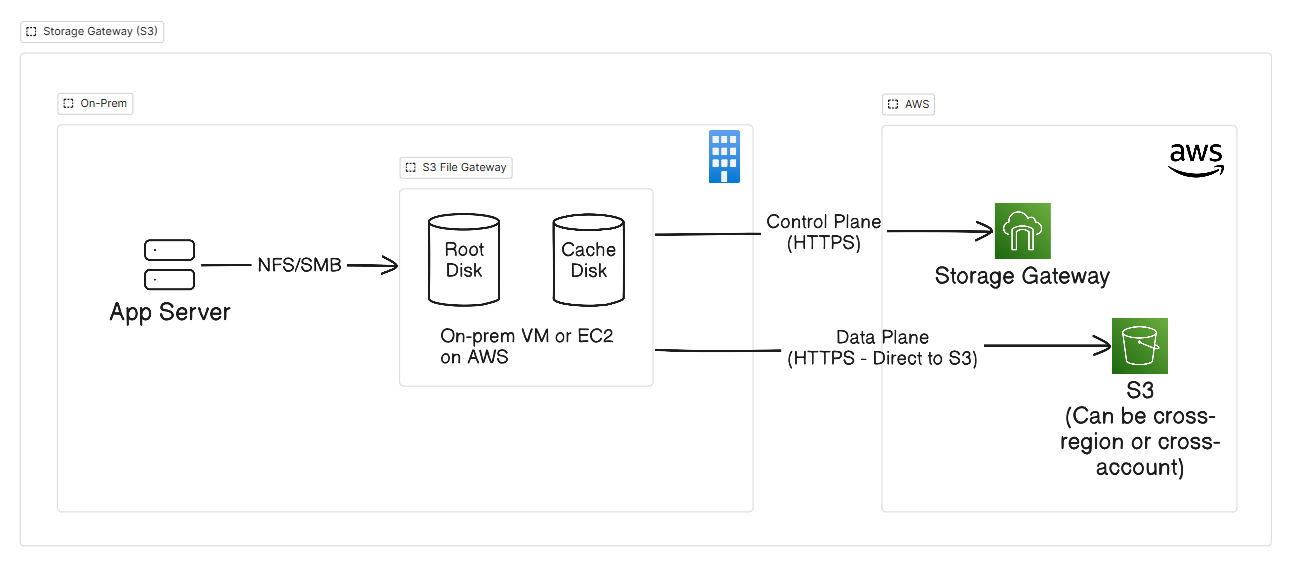
1. AWS S3 Storage Gateway
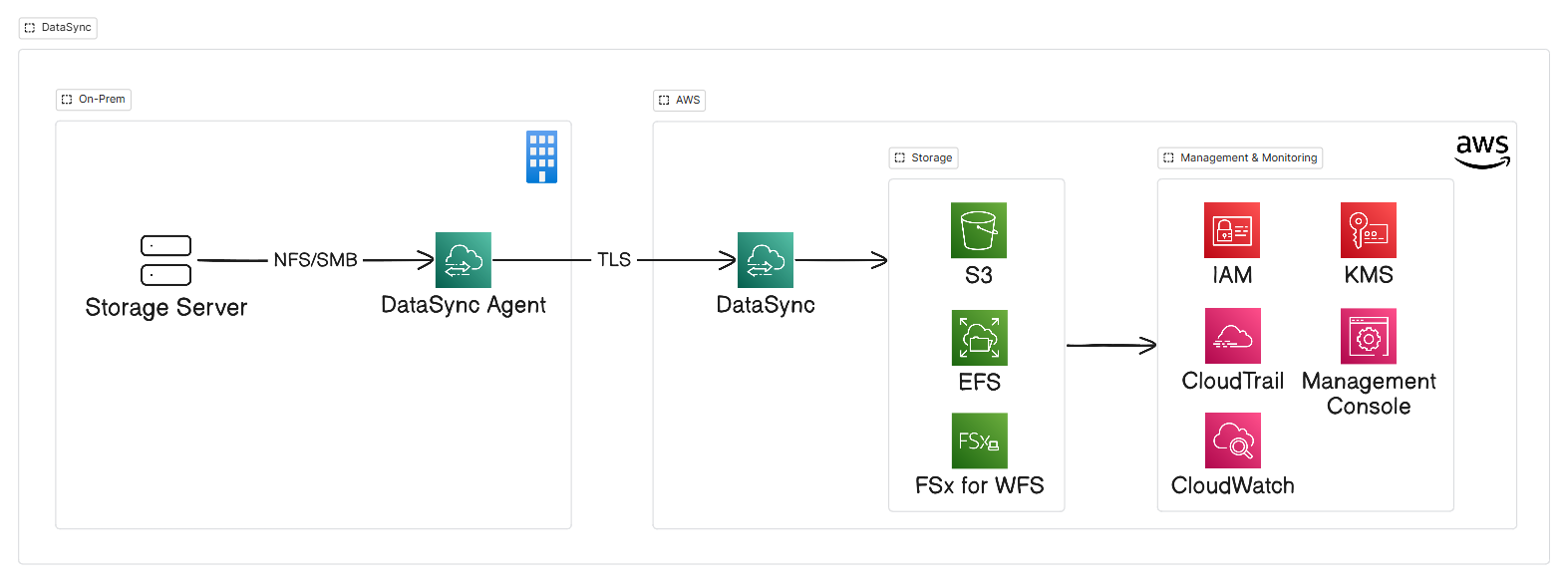
2. AWS DataSync
Comparing Capabilities and Architectural Intent
| Dimension | AWS DataSync | AWS Storage Gateway (S3 File Gateway) |
|---|---|---|
| Primary Purpose | Automated, high-throughput bulk data movement and periodic synchronization. | Ongoing, hybrid, low-latency file access via local caching mounts. |
| Storage Protocols | NFS, SMB, HDFS, Object (S3 API). | NFS v3/v4.1, SMB 2.0/3.0. |
| Target AWS Storage | Amazon S3, Amazon EFS, Amazon FSx (all variants). | Amazon S3 (Standard, S3 Glacier Flexible, Deep Archive). |
| Target Architecture | Batch/Scheduled ingestion tasks; does not provide real-time local mount points. | Caches frequently accessed files locally (up to 64 TiB cache disk); full dataset in S3. |
| Agent Requirements | Agent VM required on-prem; no agent required for cloud-to-cloud (GCP/Azure to S3) or AWS-to-AWS transfers. | Gateway deployed as an on-prem VM (VMware/Hyper-V/KVM) or hardware appliance. |
| Data Integrity | Automatic TLS encryption, multi-threaded acceleration, end-to-end checksum verification. | Native S3 object versioning, direct S3 upload with local cache eviction. |
Storage Gateway Modes Summary:
File Gateway (S3 File Gateway): Caches files and metadata locally up to 64 TiB. The entire dataset lives in S3 while only hot data is cached. Features auto-refresh to continuously sync S3-side modifications back to the local cache.
Volume Gateway (Cached Mode): Primary storage in S3 while the raw block volumes are presented as iSCSI targets. Caches frequently read blocks on-premises for performance.
Volume Gateway (Stored Mode): No cache, as the entire primary dataset is stored on local disks on-premises, with asynchronous point-in-time EBS snapshot backups copied to Amazon S3.
Tape Gateway: Replaces physical tape libraries with virtual tape drives (VTL) over iSCSI, archiving directly into cost-effective S3 Glacier and S3 Glacier Flexible/Deep Archive tiers.
Architectural Pattern: Use AWS DataSync to transfer massive multi-terabyte datasets during the initial migration phase. Once bulk data has landed in Amazon S3 or Amazon FSx, deploy an AWS Storage Gateway File Gateway on-premises so legacy on-prem applications retain low-latency, hybrid access to the new cloud file system.
AWS Transform MGN (Application Migration Service)
For workloads categorized under Rehost, modifying code or database layers is out of scope. AWS Transform MGN is the primary block-level server migration service.
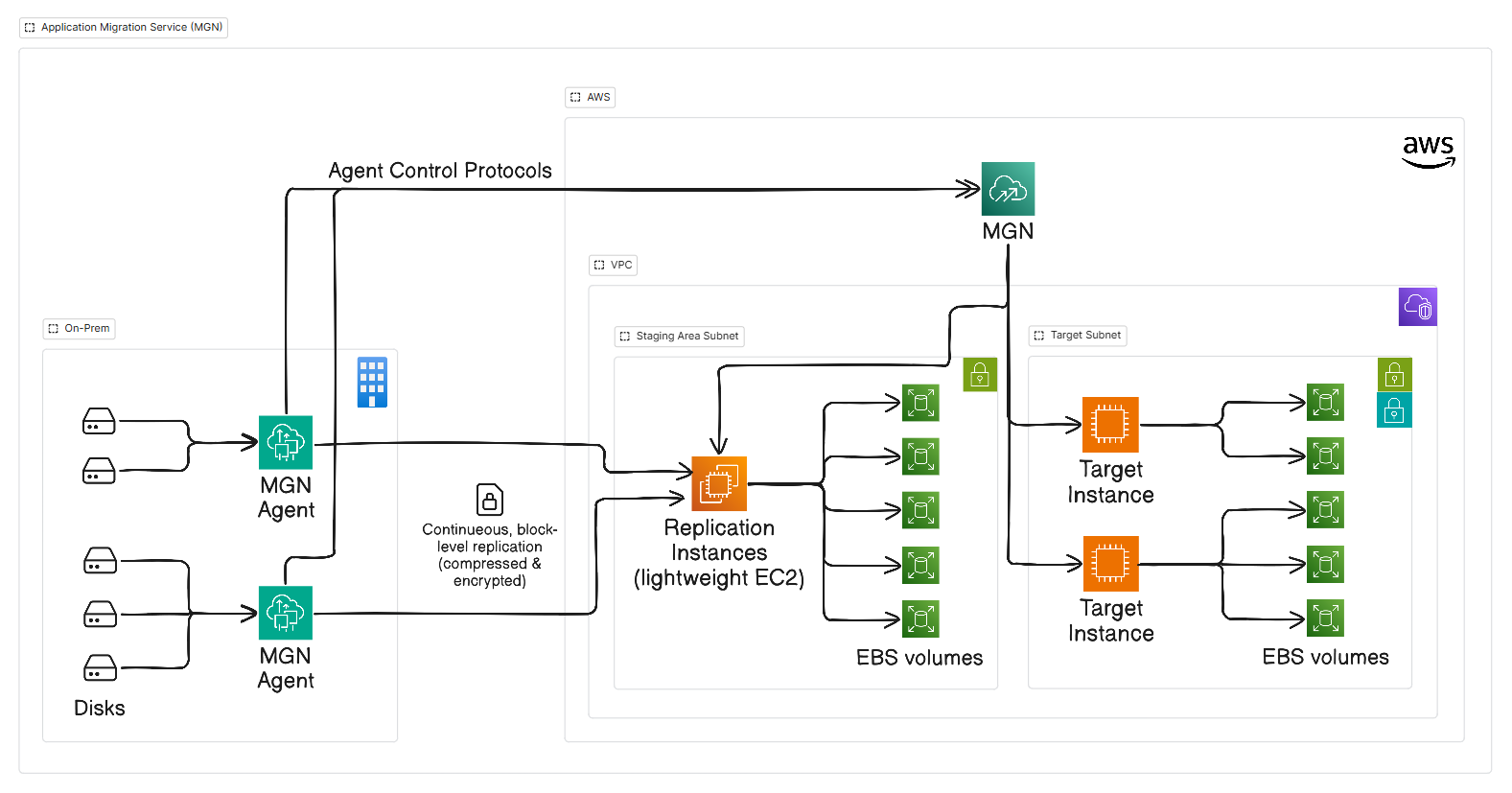
How Transform MGN Operates:
Agent Installation: A lightweight agent is installed on the source server (Windows or Linux).
Non-Disruptive Replication: The agent performs asynchronous block-level replication directly to a designated Staging Area Subnet in the AWS VPC.
Cost-Effective Staging: Data is written to low-cost EBS volumes managed by lightweight replication EC2 instances. Production compute instances are never provisioned until cutover or testing.
Test & Cutover: When ready, administrators run non-disruptive tests. AWS Transform MGN executes launch templates to convert block volumes, inject AWS drivers, and boot target EC2 instances in minutes.
Day-2 Operations: Data Protection, Compliance, and Business Continuity
The moment cutover completes, the operational risk shifts. Migrated servers and data stores are now the live system of record. Without an enterprise-grade Day-2 protection strategy, organizations expose themselves to data loss, compliance penalties, and regional outages.
Centralized Backup Governance with AWS Backup & AWS Organizations
Managing backups per server or database is unscalable and fragile. AWS Backup provides centralized, policy-driven protection orchestrated across an entire AWS Organization.
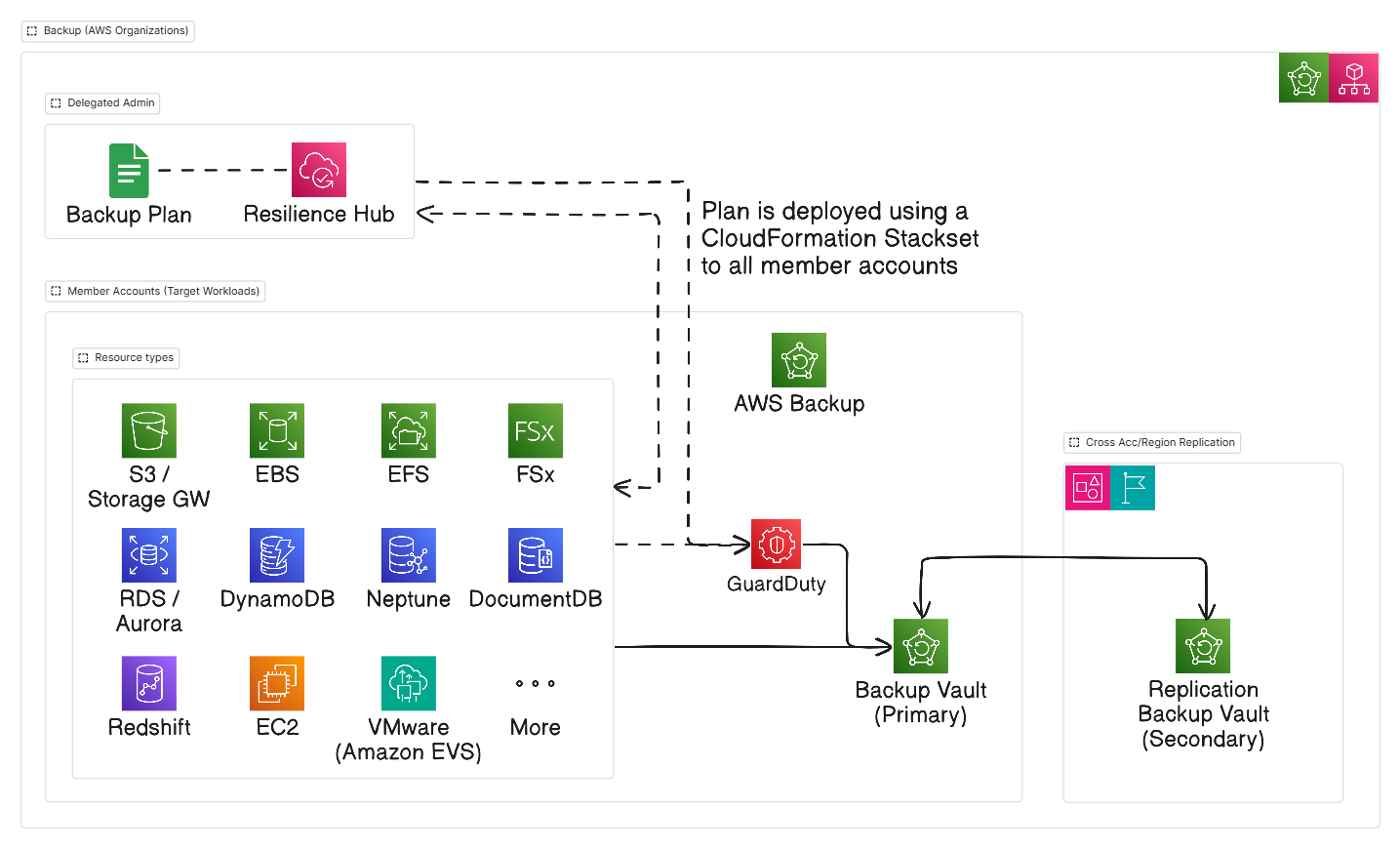
Key Enterprise Capabilities of AWS Backup:
Universal Workload Support: Native backup protection across EBS, EC2, RDS, Aurora, DynamoDB, Neptune, DocumentDB, S3, EFS, FSx, Storage Gateway, VMware (Amazon EVS), and Redshift.
Cross-Region and Cross-Account Copies: To protect against account compromises or ransomware, backup policies automatically replicate recovery points to an isolated secondary account and an alternate AWS region.
AWS Backup Vault Lock: Implements Write-Once-Read-Many (WORM) storage. In Compliance Mode, no user, not even the AWS root account or an administrator can delete, alter, or shorten the retention period of an existing backup point.
Automated Governance: Using AWS CloudFormation StackSets from a Delegated Admin account, backup policies are pushed dynamically to every new AWS account joining the organization, attaching to resources automatically via resource tags (e.g.,
Environment=Production).Security Integration: AWS Backup integrates with Amazon GuardDuty to scan backup restoration events and EBS volumes for malware before recovery.
Disaster Recovery Strategies on AWS: The Four Archetypes
Before implementing specific recovery tools, workloads must be classified against the Disaster Recovery Spectrum. Every DR strategy involves an architectural trade-off between cost and recovery speed governed by your Recovery Time Objective (RTO) and Recovery Point Objective (RPO).
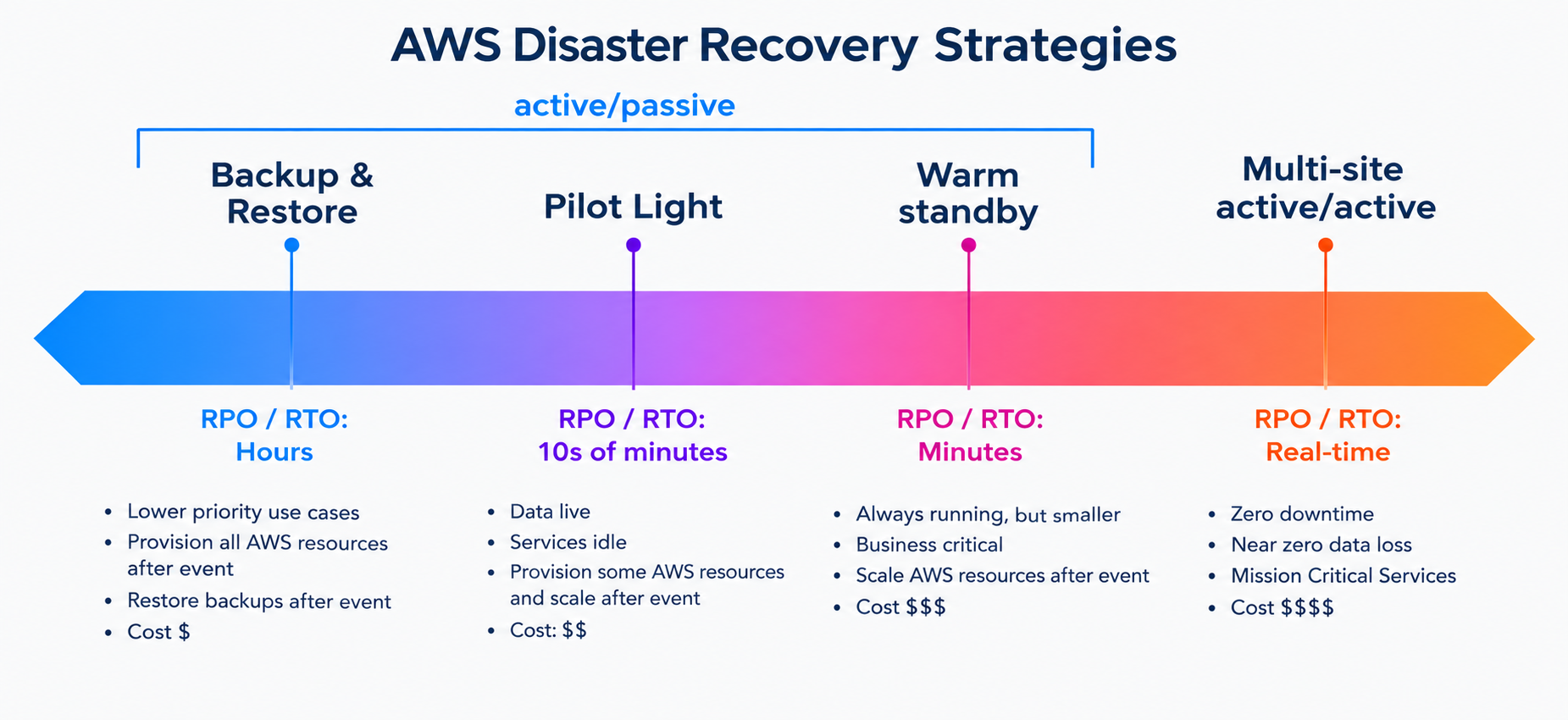
AWS classifies disaster recovery architectures into four established patterns:
| Strategy | Target RPO | Target RTO | Cost Profile | Architecture & Compute Footprint | Primary AWS Enablers |
|---|---|---|---|---|---|
| Backup & Restore | Hours | 24+ Hours | $ (Lowest) | No compute in DR region. Data backed up and replicated to secondary vaults/regions. Infrastructure rebuilt from scratch upon disaster via IaC. | AWS Backup, Amazon S3 Cross-Region Replication (CRR), CloudFormation / Terraform |
| Pilot Light | 10s of Minutes | 10-30 Minutes | $$ (Low to Moderate) | Core data continuously replicated. Minimal staging footprint (no production compute running until failover or drill). | AWS Elastic Disaster Recovery (DRS), Amazon Aurora Read Replicas |
| Warm Standby | Seconds | Minutes | $$$ (Moderate to High) | Fully functional, scaled-down version of the application runs 24/7 in DR region. Rapidly scales up via Auto Scaling during failover. | Amazon EC2 Auto Scaling, Amazon RDS Multi-Region Read Replicas, ALB |
| Multi-Site (Active-Active) | Near-Zero | Real-Time / Seconds | $$$$ (Highest) | Full production capacity runs simultaneously across two or more active AWS regions. Traffic routed dynamically based on health/latency. | Amazon Aurora Global Database, DynamoDB Global Tables, AWS ARC, Route 53 |
1. Backup & Restore (Cold Standby)
How it works: Workload data is captured via snapshots, transactional logs, and object backups, then replicated cross-region or cross-account into an isolated backup vault.
The Trade-Off: Extremely low ongoing infrastructure cost, but high operational burden during an outage. In a disaster, engineers must deploy the VPC topology, launch new compute instances via Infrastructure as Code (IaC), restore multi-terabyte databases from snapshots, and redirect DNS.
Best for: Non-critical administrative tools, internal batch reporting, dev/test environments, and regulatory cold archives.
2. Pilot Light (Warm Data, Cold Compute)
How it works: The critical data layer is kept continuously alive and synchronizing in the DR region, while the heavy compute layer (app servers, container workers, web tiers) remains turned off or in a minimal dormant state (AMIs, launch templates, container images).
The Breakthrough with AWS DRS: Traditionally, maintaining a Pilot Light was operationally complex requiring custom DB replica management and sync scripts. AWS Elastic Disaster Recovery (DRS) automates the entire Pilot Light paradigm by continuously replicating block storage into a tiny, low-cost staging area, provisioning full compute only during cutover drills or true disasters.
Best for: Tier-1 enterprise workloads where sub-second data loss is required, but a short 10-to-20 minute recovery window to spin up production compute is acceptable.
3. Warm Standby (Scaled-Down Live System)
How it works: A miniature version of the production environment is always running in the secondary AWS region. A small fleet of EC2 instances or ECS tasks actively processes background jobs or internal read requests, backed by a promoted database replica.
The Failover Mechanics: During an outage in the primary region, the secondary environment does not need to boot from scratch. Instead, AWS Auto Scaling triggers to expand the cluster from a skeleton footprint to full production scale, and Route 53 swings production traffic over within minutes.
Best for: Mission-critical business applications, e-commerce checkouts, and customer portals where prolonged recovery downtime would inflict direct revenue or brand damage.
4. Multi-Site Active-Active (Hot Standby / Zero Downtime)
How it works: Full production capacity runs simultaneously across multiple AWS Regions (e.g.,
us-east-1andus-west-2). All regions actively serve read and write traffic simultaneously.The Engineering Reality: Achieving active-active requires sophisticated global data stores that handle distributed state:
Amazon Aurora Global Database: Dedicated storage-based replication across regions with typical replication latency under one second and fast automated failover.
Amazon DynamoDB Global Tables: Fully managed, multi-master, multi-region database with automatic bi-directional replication and conflict resolution.
Global Traffic Steering: AWS Application Recovery Controller (ARC) routing controls integrated with Route 53, combined with CloudFront or AWS Global Accelerator.
Best for: Tier-0 financial settlement engines, real-time healthcare telemetry, and globally distributed consumer platforms with strict contractual zero-downtime requirements.
Continuous Resilience with AWS Elastic Disaster Recovery (DRS)
While AWS Backup provides point-in-time recovery for data corruption and retention compliance, mission-critical applications require low Recovery Time Objectives (RTO) and Recovery Point Objectives (RPO). This is where AWS Elastic Disaster Recovery (DRS) excels.
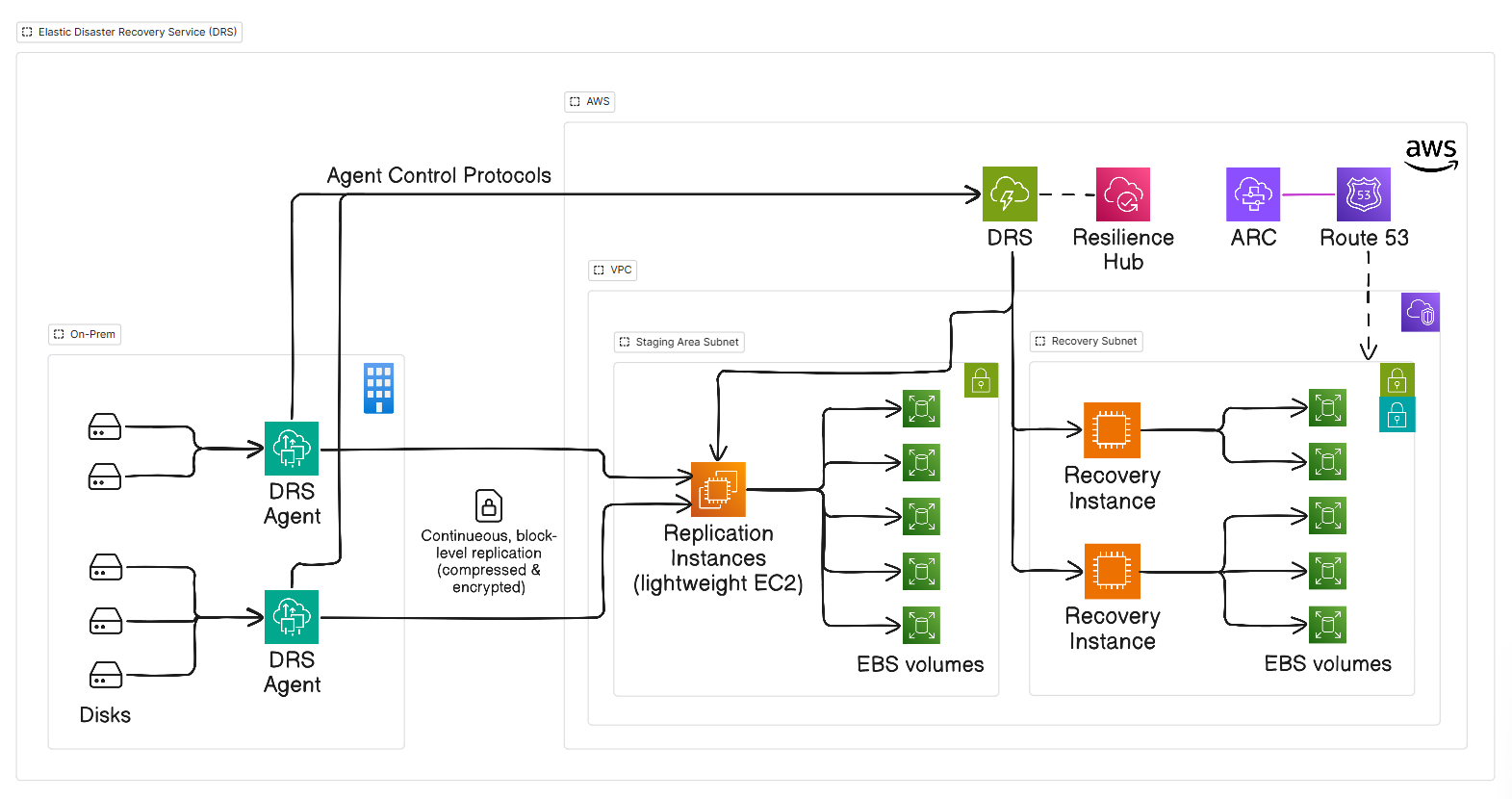
The Architecture of Elastic Disaster Recovery:
Heritage & Mechanism: Like Transform MGN, DRS uses block-level asynchronous continuous replication. But while MGN is a temporary service that ends upon migration cutover, DRS operates perpetually.
Ultra-Low TCO: DRS replicates directly into a low-cost staging area containing lightweight replication instances and low-cost EBS storage. You do not pay for duplicate compute, idle licenses, or full-sized databases while waiting for an emergency.
Sub-Second RPO & Minute RTO: Changes are streamed continuously at the OS block level, delivering sub-second data lag.
Drill Readiness: DRS allows non-disruptive disaster recovery drills anytime. Testing launches recovery instances into an isolated recovery subnet without pausing or impacting the ongoing replication stream.
The Resiliency Ecosystem: Resilience Hub, ARC, and Route 53
Disaster recovery is not just about spinning up servers. It is about orchestrated traffic redirection and validated health posture.
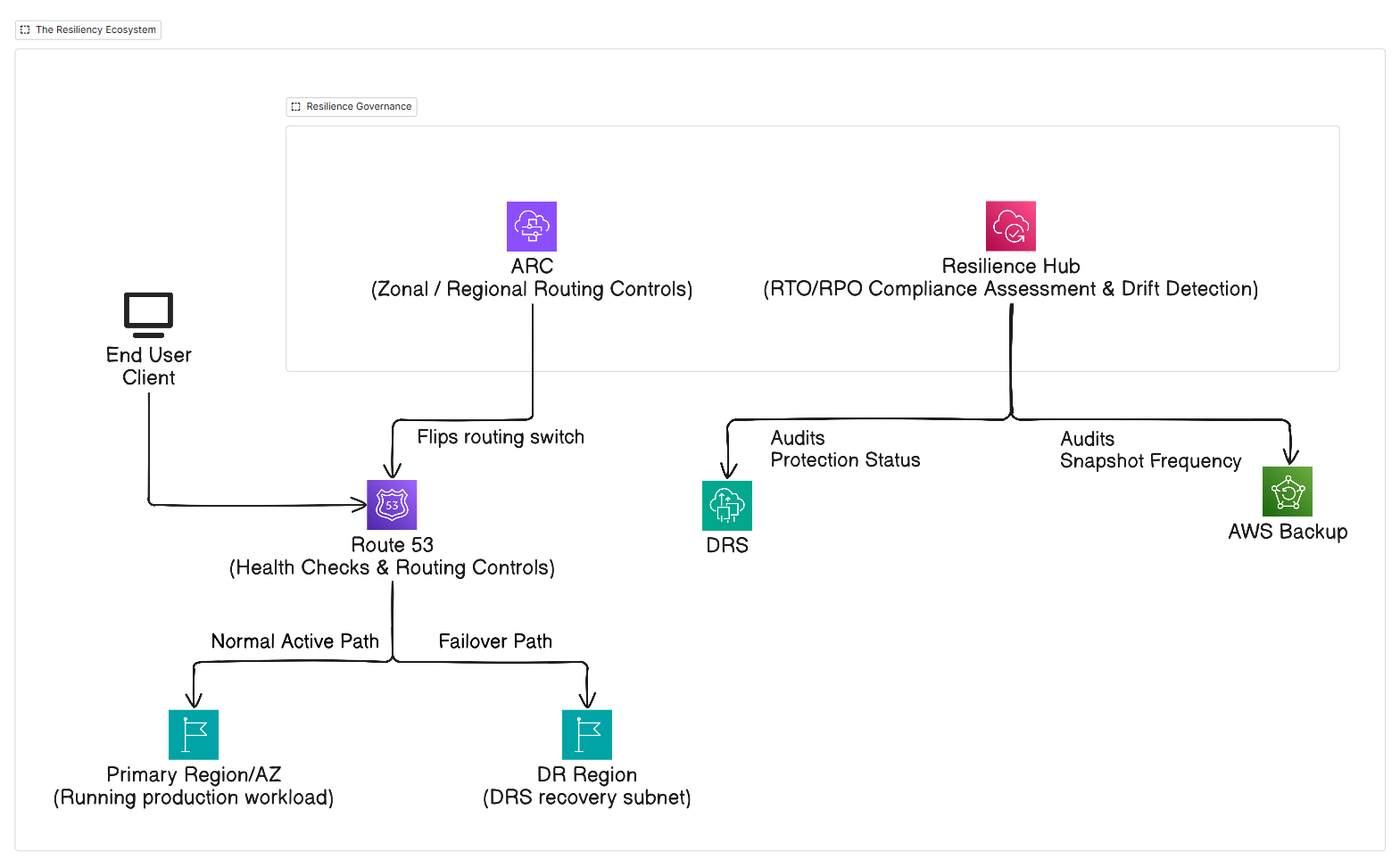
AWS Resilience Hub: Acts as the central resilience posture dashboard. It evaluates the application architecture against defined RTO and RPO targets, audits AWS Backup policies and DRS replication states, and flags drift when new untracked resources appear.
AWS Application Recovery Controller (ARC): Provides high-reliability failover capabilities:
Routing Controls: Highly available failover switches isolated across five AWS regions that never depend on the region undergoing an outage.
Zonal Autoshift: Automatically redirects traffic away from an Availability Zone experiencing degradation.
Amazon Route 53: Connects DNS health checks with ARC routing control switches, dynamically failing over domain endpoints from degraded primary instances to DRS-recovered instances in minutes.
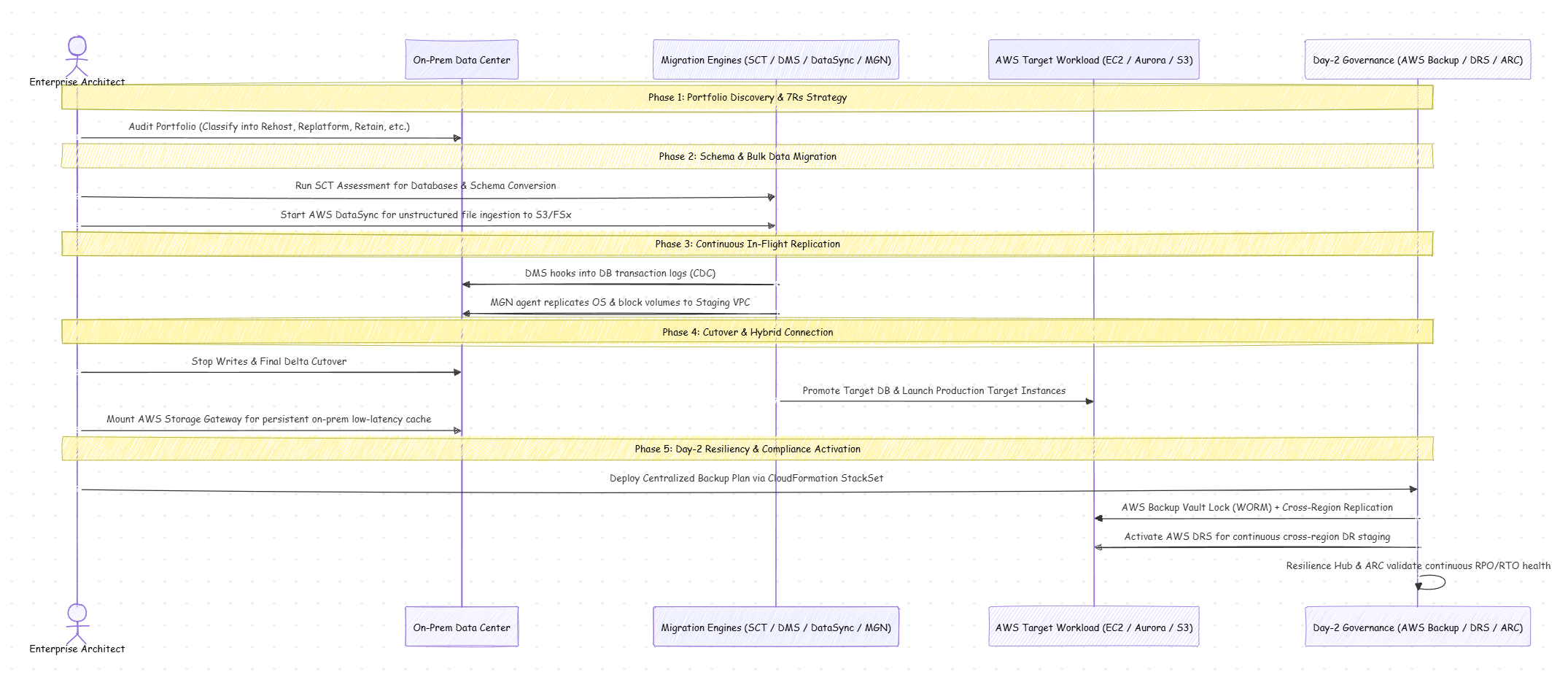
End-to-End Reference Architecture & Operational Lifecycle
How do all these services combine during a multi-phase enterprise journey? The matrix below tracks workload progression from legacy hosting to bulletproof cloud operation.
Field Notes, Real-World Gotchas, and Best Practices
In production migrations, edge cases and subtle implementation details can turn a smooth plan upside down. Here are key lessons learned from field deployments:
1. Database Migration Service (DMS) & Large Objects (LOBs)
The Pitfall: DMS defaults to Limited LOB mode to save memory, truncating LOBs exceeding the configured max size (e.g., 32 KB). Switching to Full LOB mode avoids data truncation but severely degrades replication performance because LOBs are queried row-by-row.
The Fix: Use Inline LOB mode, introduced in modern DMS versions. Inline mode replicates small and medium LOBs within the replication stream without extra round-trips, reserving secondary queries only for extreme outliers.
2. AWS DataSync Network Optimization
The Pitfall: High-throughput DataSync tasks saturating Direct Connect or VPN links, starving active production applications during business hours.
The Fix: Configure Bandwidth Limits inside the DataSync Task options. DataSync allows granular bandwidth throttling schedules (e.g., limit to 200 Mbps between 08:00 and 18:00, burst to 2 Gbps overnight and over weekends).
3. Storage Gateway Auto-Refresh Caching
The Pitfall: External scripts upload files directly to S3, but on-prem users accessing the File Gateway report missing files because the gateway cache hasn't synced.
The Fix: Turn on Automated Cache Refresh (based on time since last access) or integrate S3 Event Notifications with an AWS Lambda function that invokes the
RefreshCacheAPI immediately after an S3 object write.
4. Transitioning from Transform MGN to DRS Post-Cutover
The Nuance: AWS Transform MGN and AWS DRS share the same underlying block-replication agent technology, but they have distinct service roles:
Transform MGN is an ephemeral tool: once the target instance is cut over and validated, the source server replication is terminated, the staging instance is cleaned up, and the job is finalized.
DRS is an ongoing, continuous operational tool: after MGN cutover, you install the DRS Agent on the new production cloud instances (or on remaining hybrid nodes) to establish perpetual, cross-region or cross-zone disaster recovery.
5. Ransomware Defense with Backup Vault Lock
- The Rule: Always deploy your secondary backup vault into an isolated Disaster Recovery AWS Account within your AWS Organization. Apply an AWS Backup Vault Lock policy with a mandatory retention cooldown period in Compliance Mode. If an attacker compromises root or administrator credentials in the primary production account, they cannot purge or encrypt the locked recovery vaults in the isolated account.
Conclusion
Migrating to the cloud isn't just about moving code and data across network boundaries. It is an opportunity to elevate your architecture from fragile, perimeter-bound servers to an automated, resilient, and self-healing cloud foundation.
By coupling the 7Rs framework with the precision tooling of SCT, DMS, DataSync, and Transform MGN, you can execute rapid migrations with minimal cutover risk. And by anchoring your new landing zone in AWS Backup, Elastic Disaster Recovery (DRS), and AWS Resilience Hub, you ensure that your workloads remain protected, compliant, and always available on Day 2 and beyond.
References & Further Reading
AWS Architecture & Well-Architected Framework
Disaster Recovery of Workloads on AWS: Recovery in the Cloud (AWS Whitepaper): Authoritative guide outlining RTO/RPO trade-offs, architecture patterns, and failover mechanics.
Disaster Recovery Options in the Cloud (AWS Whitepaper): Detailed breakdown of Backup & Restore, Pilot Light, Warm Standby, and Multi-Site Active-Active strategies.
AWS Well-Architected Framework: Reliability Pillar: Plan for Disaster Recovery (REL 13): Best practices for architecting resilient workloads, defining availability objectives, and testing recovery paths.
Migration Strategy & Workload Transition
AWS Prescriptive Guidance: Migration Patterns & Strategies: Practical guides and decision matrices for enterprise cloud migration.
AWS Application Migration Service (MGN) User Guide: Documentation on agent deployment, staging area VPC setup, and non-disruptive cutover testing.
AWS Database Migration Service (DMS) User Guide: Configuration guide for full loads, Change Data Capture (CDC), and LOB handling.
AWS Schema Conversion Tool (SCT) User Guide: Automated assessment reports and cross-engine database schema translation.
Storage & Hybrid Synchronization
AWS DataSync User Guide: High-speed bulk data movement protocols, network bandwidth throttling, and integrity verification.
AWS Storage Gateway User Guide: Hybrid deployment guides for S3 File Gateway, Volume Gateway (Cached vs. Stored), and Tape Gateway.
Day-2 Disaster Recovery, Governance & Compliance
AWS Elastic Disaster Recovery (DRS) User Guide: Continuous block-level replication, staging areas, and drill orchestration.
AWS Backup Developer Guide: Centralized backup management across AWS Organizations and multi-service protection plans.
AWS Backup Vault Lock: Configuring immutable WORM compliance to protect recovery points against ransomware and insider threats.
AWS Resilience Hub User Guide: Application resilience posture assessment, drift detection, and RTO/RPO validation.
Amazon Route 53 Application Recovery Controller (ARC) Developer Guide: Multi-region routing controls, zonal autoshift, and high-reliability failover mechanisms.
About the author
- Full-stack Developer focused on the intersection of high-performance web and scalable AWS infrastructure. I write Well-Architected to share patterns for building resilient, cost-effective, and developer-friendly cloud-native web applications.
Comments
Join the discussionNo comments yet. Be the first to comment.
Advanced AWS Architecture & IaC
Deep dives, production-ready blueprints, and practical guides for building scalable cloud infrastructure. This series focuses on real-world AWS architecture, cross-account patterns, and Infrastructure as Code (CDK & Terraform), designed with the Well-Architected Framework at its core.